
October 24th, 2026, posted in for_founders
by Miruna
This article is part of a series about healthcare software automation. See below a list of all the articles in this series, they’ll be linked as we post them. If you don’t see links below, they’re most likely coming soon:
- Are you losing time & money to manual healthcare workflows?
- What you can automate in your healthcare app workflows
- How we built software for the medical industry
- Should you automate your healthcare workflows?
- Types of apps you can build for the medical industry THIS ARTICLE
The medical industry is not only powered by blood, sweat and insane bills. A big part of healthcare is also the software that holds it together. The software that keeps track of patient data, appointments, insurance rules, invoicing, you name it.
But a lot of medical software is built like a template. It’s made to be used by everyone, but not everyone works the exact same. You’ll have to find workarounds or start using other apps to be able to fulfill all your clinical tasks.
And to make it worse, a lot of medical software looks like it was made for a robot, so you’re already deeply unhappy the moment you open it.
As much as this is starting to sound like the beginning of an ad, it’s rather the cruel reality of what medical practices have to deal with on the daily. When generalized EHRs, CRMs or billing programs don’t cut it anymore, you might want to consider building custom software.
So in this article, we’re going to talk about what kind of apps you (or let’s say us, together) can build for your medical practice, that will improve your day to day work and most importantly, patient outcomes.
Telemedicine & patient portal solutions
Not all people like scheduling appointments through phone calls. If anything, most people hate it. So why make your patients’ lives harder when you can build an app that allows them to schedule their own appointments and you get to just confirm (or not)?
Patient portal apps are a great way for patients to handle their own data, review their past appointments and medical files, schedule future appointments, manage recommendations, referrals, lab results, or even get in touch with medical specialists.
A dedicated patient portal can also help patients reach doctors easier through telemedicine. A study by the Harvard Medical School says that 76% of hospitals in the U.S. connect doctors and patients remotely via telehealth, up from 35% a decade ago. Telehealth is more convenient, cost-saving and beneficial for those with mobility issues.
Here are a few major features you can add to a patient portal app:
- HD video consultations with EHR data sync. Doctors can talk to patients through video calls and sync all data in their existing EHRs, which patients will then be able to see in their own version of the app.
- Secure messaging and patient file sharing. Allow patients to contact doctors for follow-up questions while keeping their data secure.
- Scheduling and billing integration. Let patients set and manage appointments. Your own app can be connected to your schedule so they can only access available dates and time slots.
- Mobile and desktop access. The biggest benefit of a dedicated app is that it can be used on-the-go. This way, you’re also adapting to the needs of your less tech savvy patients.
EMR/EHR integration & development
According to The Office of the National Coordinator for Health Information Technology, EMRs are an electronic versions of paper charting medical professionals do in their clinics. These contain patient data, medication given, diagnoses, health parameters. But this data stays within one practice. They transport data that usually goes on paper into documents, but to give that data to specialists, you still have to print it out.
By comparison, an EHR (Electronic Health Record) is built to help communicate patient information to other systems, in case they go to other clinics, states or countries. That information is not only managed by healthcare providers, but also by patients themselves, who can review their lab result evolution or review appointment notes.
These systems help clinics run better in the age of technology. As opposed to keeping everything on paper, EHR systems ensure patient data stays securely in one place, and can be safely sent to other clinics the patients need to go to.
When integrating or building an EHR system into your medical practice, you can simplify interoperability or deep integrations that make clinical data usable, fast, and secure.
Here are a few benefits of integrating EMR or EHR systems:
- HL7/FHIR compliant integrations
- Custom EHR modules and APIs
- Data migration and synchronization
- Workflow automation for documentation
Healthcare analytics & reporting tools
A healthcare company or cluster of clinics aren’t your classic startup that always works with complex analytics dashboards. When it comes to healthcare, patient outcomes and treatment success are the most valuable results you can get.
But just like any type of data, you can track key parts of a healthcare company as well. You’re still dealing with bills, earnings, invoices, or appointment data. But your staff is too busy with patient care to generate reports as well. Luckily, that’s where software comes in.
If you build your own business management software, you can create dashboards that adapt to your needs. Whatever data points are relevant to your business can go into this dashboard, such as how many patients you have, how many appointments get cancelled, how many procedures you do, or your staff’s schedule and status.
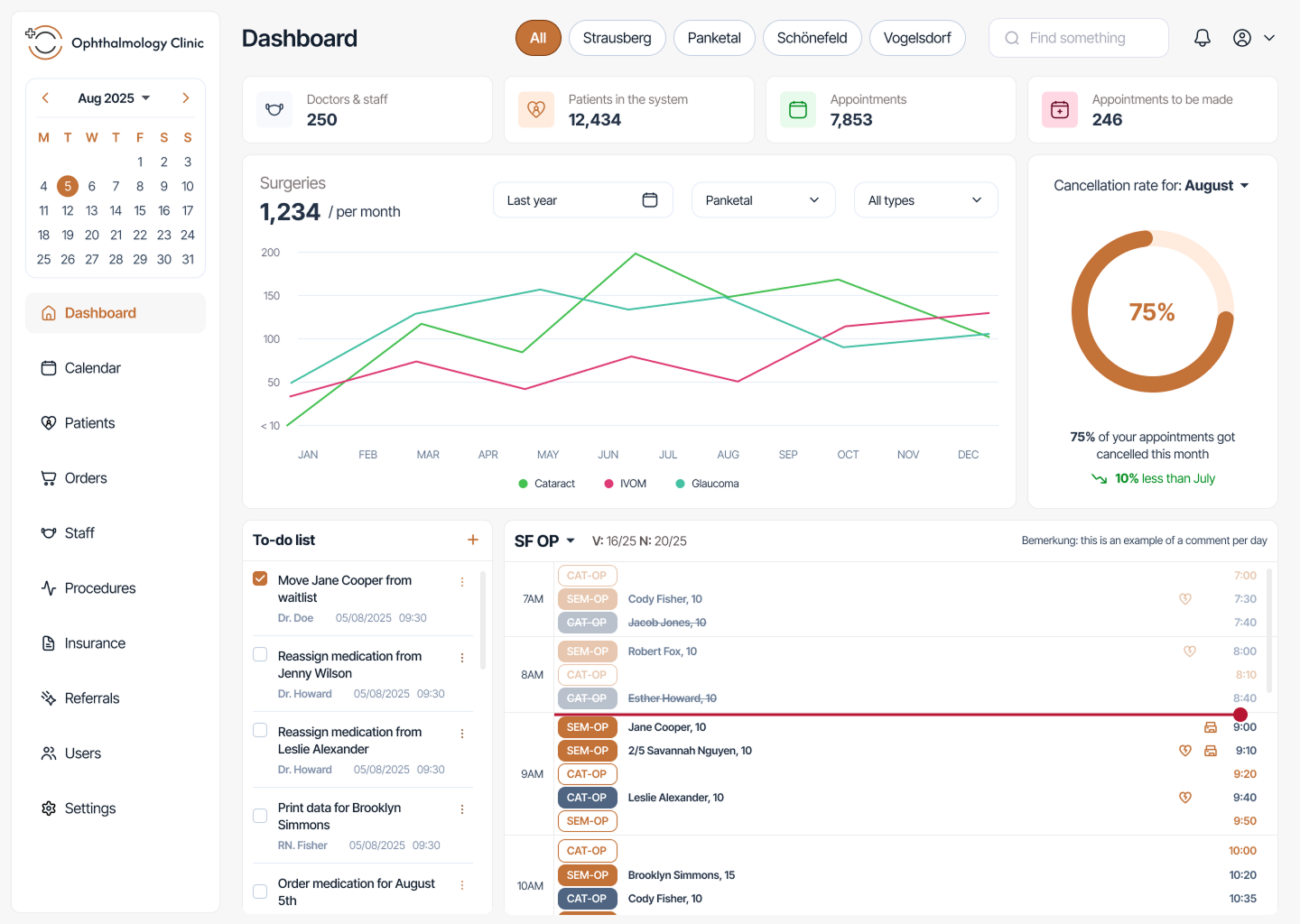
When organizing all this data through software, not only you’re keeping it safer, but it’s also more easily accessible. Of course, you don’t need a standalone app just for stats: if your business needs are more complex, your own piece of software can cover many other user flows.
Here’s what you can do in a stats and analytics-centered healthcare app:
- Custom KPI dashboards
- Predictive analytics and reporting automation
- Integration with EMR and billing data
- Secure data visualization layers
Healthcare mobile & web apps to manage patient care
Patient-facing apps don’t need to be appointment managers only. You can build all-encompassing apps that let patients manage their data, review their medical files & consultations, schedule lab work & review their results, or more specific aspects of your practice.
A study in Farmacia Hospitalaria shows that patient-facing apps help them manage their own care, their symptoms, reduce complications rates, pay more attention to & take their medication and overall enhance their quality of life.
These apps ensure that patients pay better attention to their own care so that healthcare professionals can focus on important work. They can be used to notify patients to take their medications, to get checkups, or you can connect them to their wearables and track their status.
And so, these apps don’t have to be solely patient-facing. All the data patients input in these apps can come back to healthcare professionals, who can monitor their patients’ status without seeing them. When issues do occur, they can use in-app chat systems to tell the patients to make an appointment.
Such apps are also great ways to analyze how your patient care is going. Are your patients happy? Are they giving you positive feedback? Are they actually getting better? As we’ve found while working with healthcare companies, an app where you input status information can gather that data and create useful patient-related stats.
Here’s what you can do with healthcare apps:
- Mobile (iOS and Android) apps that make healthcare easier and more accessible to manage
- Remote patient monitoring tools
- Wearable device connectivity
- Patient feedback and analytics dashboards
How healthcare workflow automation actually works: from first call to launch
Okay, so you're convinced that automating your workflows or building an entire app for your healthcare business is what you need. What does the actual process look like? Here's how we typically approach it at UPDIVISION, from the initial conversation through to a live, working system.
Step 1: Discovery and consultation
Every project starts with a conversation, and it’s meant to help us understand your business, your work, and what issues you’re facing.
What workflows are eating up the most time? Where do mistakes happen most often? What systems are you currently using and how do they (or don't they) talk to each other? What have you tried before that didn't work? What are your compliance requirements? What does your team actually need day to day?
This discovery phase is where the real work begins. The goal is to get a detailed, honest picture of how your organization operates right now, the good and the bad. We map out your existing workflows, identify the pain points that have the biggest impact, and start to understand where automation can actually help.
We also talk about priorities. Because while there might be fifteen things you'd love to automate or turn into app features, some of them are more pressing than others. Together, we narrow down to a focused scope for the first phase of the project: the workflows that will deliver the most value the fastest.
This phase usually takes a few sessions spread over one to two weeks. By the end, we have a shared, documented understanding of the problem we're solving.
Step 2: Technical assessment and system mapping
Once we understand your workflows, we need to understand your technical environment. What EHR are you using? What billing system? What patient communication tools? Do any of these have APIs that allow external systems to connect? Are there any legacy systems in the mix that might be trickier to work with?
We also look at your data. What format is it in? Where is it stored? Who owns it? How is it currently moving between systems? This matters because automation is fundamentally about data flow, and if the data is messy or siloed in an incompatible format, that needs to be addressed before anything else. If we’re building you an app, we gotta figure out how to import your existing data.
The output of this phase is a technical map: a clear picture of your current system landscape, the integrations that need to be built, and any technical hurdles we'll need to navigate. This is also where we identify whether there are off-the-shelf integration tools (like HL7 FHIR interfaces for EHR connectivity) that we can leverage, or whether we need to build custom connectors.
Step 3: Solution design
Now that we know what we're solving and what we're working with, we design the solution. This means specifying exactly how each automated workflow will work: what triggers it, what actions it takes, what decisions it makes, and what happens when something goes wrong.
Good workflow design in healthcare requires real care around exceptions. Automation works brilliantly for the 90% of cases that follow predictable patterns. But healthcare has a lot of edge cases:
- A patient whose insurance has lapsed
- A lab result that falls outside normal parameters
- A prior authorization that requires additional documentation
Your automated system needs to handle routine cases smoothly and escalate the unusual ones to the right human.
During solution design, we also think about the user experience for your staff. If there's a dashboard or admin interface involved, we design it to be intuitive and practical, not just functional. The best automation in the world fails if the people using it can't figure out how to interact with it.
We share these designs with you, walk through them together, and iterate until everything looks right. It's much easier to change a design on paper than to change code in a live system.
Step 4: Development
This is where we build what we've designed. Depending on the scope, this might involve building a custom web app or admin platform, connecting APIs between existing systems, writing automation logic and workflow rules, building data transformation layers for systems that use different formats, setting up monitoring and alerting, and creating test environments that mirror your production setup.
Development happens in sprints, which means you're seeing progress regularly rather than waiting months for a big reveal. We'll typically show you working features every two weeks, get your feedback, and adjust as we go. If priorities shift (and they sometimes do), we can adapt.
We also keep a close eye on security throughout development. Healthcare data is sensitive, and HIPAA compliance isn't optional. We build with encryption, access controls, audit logging, and data handling best practices baked in from the start, not bolted on at the end.
Step 5: Testing
Before anything goes near your real patients or real data, we test extensively.
Unit testing makes sure each individual piece of the system works correctly in isolation. Integration testing makes sure the pieces work correctly together. End-to-end testing simulates complete workflows from start to finish, including the edge cases we designed for in step three.
We also do user acceptance testing with your actual team. Real people, doing real tasks, using the system the way they'll actually use it in production. This is where we find out if the interface makes sense, if the workflow logic matches reality, and if there are any gaps between what we designed and what people actually need.
Healthcare-specific testing also includes load testing (what happens when 500 eligibility checks come in at the same time?), failure mode testing (what happens when the EHR API is temporarily down?), and security testing.
It's not the most glamorous phase of a project, but it's one of the most important. The goal is to find every problem before it can affect a patient or a provider.
Step 6: Training and change management
A new system that no one knows how to use doesn't actually help anyone. Before launch, we work with your team to make sure they understand how the new system works, what's changed about their daily tasks, and what to do when something unexpected comes up.
This is an ongoing effort to help your staff build confidence with their new tools. We create documentation, run walkthroughs, and stay available to answer questions during the transition period.
Change management is often underestimated in software projects. People get used to doing things a certain way, and a new system, even a better one, requires adjustment. The more your team feels supported and heard during the rollout, the smoother the transition will be.
Step 7: Launch
When everything is tested, your team is trained, and all the go-live criteria are met, you launch. But not all at once.
A phased rollout is almost always the right approach in healthcare. You might start by automating appointment reminders for one clinic, see how that goes for a few weeks, then expand to other workflows and other locations. This reduces risk and gives you time to identify any issues before they affect a large portion of your operations.
In the case of an entire app, we usually release an MVP first, which focuses on just key features the app requires to run. It’s a great way to make sure the app concept works and fits your user needs, before you spend time & effort building more complex features.
During the initial rollout period, we monitor the system closely. We're watching error rates, processing times, and any unexpected behavior. We have rollback procedures ready if something serious comes up and we stay in close contact with your team to make sure they're not running into issues.
For most businesses, the first few weeks after launch are a mix of excitement (“look at all these cool things!”), fine-tuning (“we gotta do this a little bit different”) and adversity (“I don’t like all of this computer stuff! What happened to pen and paper?”). That's normal and expected.
Step 8: Optimization and iteration
Launch isn't the end. It's the beginning of a continuous improvement cycle.
Once your automation is live and your team has settled into the new workflows, you start gathering real data. How much time is being saved? Where are the remaining bottlenecks? Are there new workflows that should be automated next? Are there aspects of the system that could be optimized based on actual usage patterns? Are there key features users are asking for?
Good automation gets better over time. As your organization evolves, as you add new services or new locations, as regulations change, your automated workflows need to evolve too. We stay available to help you iterate, expand, and optimize.
Overall, you can build a wide variety of apps for a medical business. It all comes down to what you actually need: to improve patient care and engagement? To improve your clinical and staff workflows? Or to integrate patient data, appointments, procedures and treatments all in one platform?
Regardless of which of those you need, we’re here to help you out. To learn more about what we’ve done in the healthcare industry, you can check out these stories on what we built for healthcare companies. Or you can read more about whether or not you’re losing time and money to inefficient healthcare workflows.
To find out how we could work together and what we could build for you specifically, contact us.