October 24th, 2026, posted in for_founders
by Miruna
Imagine hiring a construction crew, handing them a napkin sketch that says "three bedrooms, something modern," and asking them to start pouring concrete tomorrow. You'd probably end up with a house. Just not the one you had in mind, and definitely not on budget.
In software development, the napkin sketch is surprisingly common. A founder has a clear vision in their head, the team gets a short feature list, and development starts right away. A few months later, everyone realizes the user flows don't fit together, a key feature is missing, and the estimate was off by half.
Product discovery exists to prevent exactly that. In this article, we'll explain what product discovery is, why it matters even more now that AI writes a big chunk of the code, and how we run it at UPDIVISION, step by step.
What is product discovery in software development?
Product discovery is the process of figuring out what to build, who it's for, and why, before a single line of code is written. It's the first stage of a software project, and it turns a business idea into a clear, shared plan that designers, developers and stakeholders can all work from.
A good product discovery process answers questions like:
- Who will use the product? Customers, admins, managers, partners, and what each of them needs to get done.
- What problems does it solve? The business goals behind the app and the user pain points it should fix.
- Which features matter most? What goes into the first release and what can wait.
- How should it look and feel? Branding, style, and how users move from one screen to the next.
- How long will it take and how much will it cost? Estimates based on real requirements, not guesses.
Why go through all this first? Because changes are cheap on paper and expensive in code. Moving a button in a design file takes minutes. Reworking a feature that's already built, tested and connected to a database can take weeks.
Product discovery also gets everyone on the same page. When the client, the designers and the developers all agree on what's being built, there are far fewer "that's not what I meant" moments down the road.
Why product discovery matters even more with AI-assisted development
AI coding tools have made writing code much faster. But speed only helps if you're heading in the right direction.
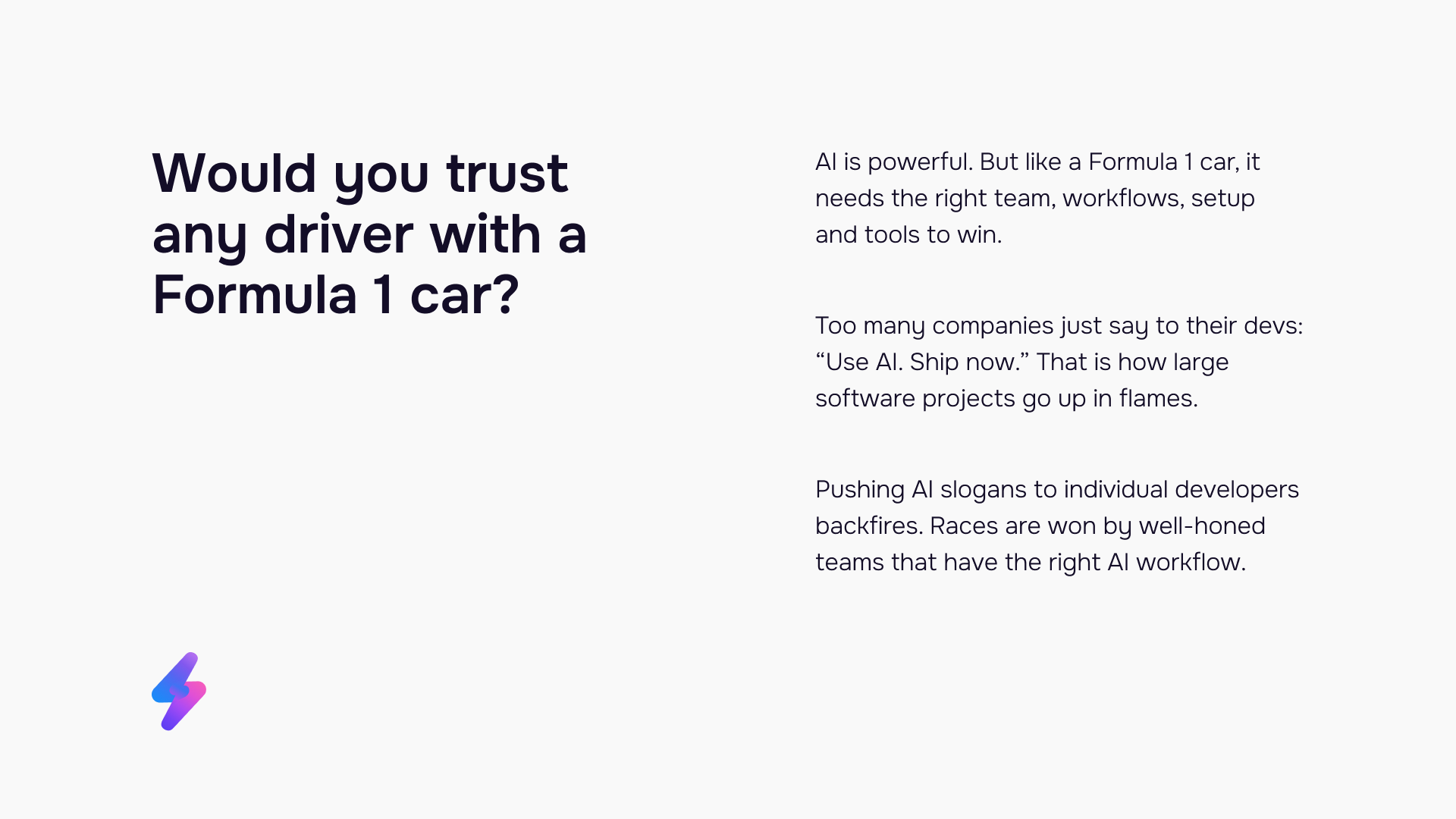
Think of AI as a Formula 1 car. It's incredibly powerful, but you wouldn't hand it to just any driver and hope for a win. Races are won by teams with the right setup, workflows and tools. Software works the same way. Telling developers to "use AI and ship now" is how large projects go off track.
AI coding tools are only as good as the instructions they get. Give them a vague prompt and they'll confidently build the wrong thing, just faster. Give them a detailed spec, with clear user stories, designs and technical requirements, and they become a real productivity boost.
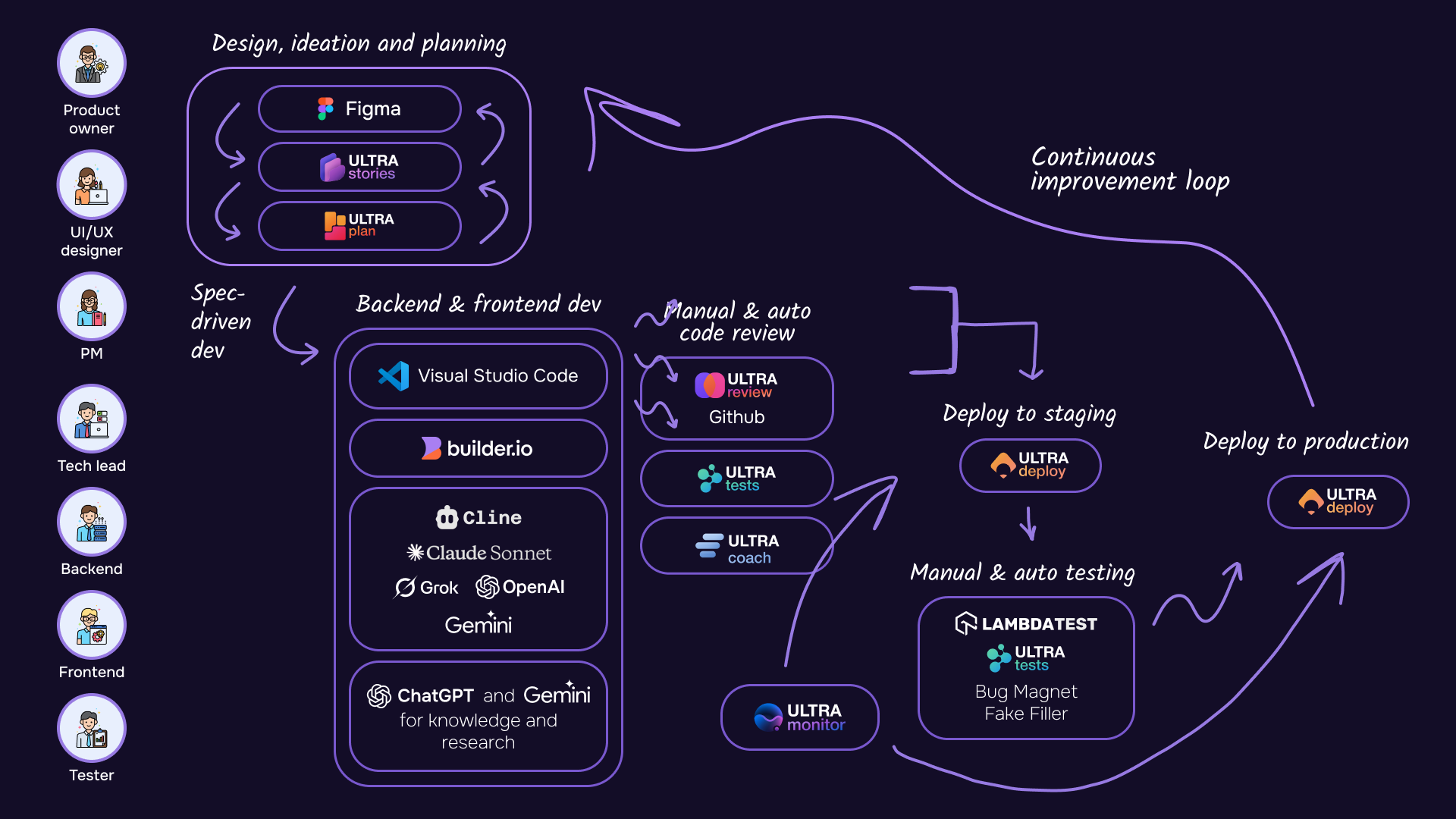
That's why we treat product discovery as the foundation of spec-driven development. Ideas are written and designed by humans, AI turns them into user stories, and those stories become a technical blueprint for the code. The result is stable, scalable software, delivered on average 3.7x faster.
How we do product discovery at UPDIVISION: 4 stages
Our product discovery process has four stages. Each one builds on the previous, so by the time development starts, every feature has a design, a user story and a ready-to-code task behind it.
Stage 1: Planning. Understanding your business and your users
Everything starts with conversations. We sit down with you to talk about your industry, your business goals, and the people who will use your app. What are they struggling with today? What would make their work easier? What does success look like for you six months after launch?
Our product owners and business analysts gather input from every stakeholder involved. AI meeting assistants help them capture ideas, decisions and action points, so nothing gets lost between calls. We then combine your input with what we've learned from building hundreds of apps.
By the end of this stage, we've mapped out:
- User types. For example, a customer, a store manager and an admin, each with their own goals and permissions.
- Key features. What each user type needs to do in the app, and which features belong in the first release.
- Look and feel. Your branding, visual style and design references, so the app looks like it belongs to your business.
Stage 2: Design. Every key screen, in Figma
We follow a design-first approach. Before any code gets written, our UI/UX designers use Figma to design every key screen of your app, based on the user types and features from the planning stage.
This gives you a detailed look at your product early on. You can click through the screens, see how users move from one page to another, and ask for changes while they're still quick and inexpensive to make.
We build designs that are ready for implementation with AI tools. Our UI kits and component libraries keep everything consistent and easier to build. Buttons, forms, cards and menus are created once as reusable components, with multiple variants, styles and flexible layouts. Developers (and the AI tools they use) then work from the same building blocks, instead of reinventing them on every screen.
Stage 3: User stories. From features to specs in minutes with ULTRA Stories
A user story describes a feature from the user's point of view. For example: "As a store manager, I want to export last month's orders as a spreadsheet, so I can share them with accounting." Each story comes with acceptance criteria, the conditions that must be met for the feature to count as done.
Writing user stories for an entire app used to take days. Now it takes minutes. In ULTRA Stories, our proprietary user story writing tool, we generate user stories based on two inputs:
- Detailed feature descriptions written by humans, our product owners and business analysts, based on everything we learned in the planning stage.
- The design files from the design stage, so the stories match exactly what users will see on screen.
The AI does the heavy lifting of turning these into structured, consistent user stories. Our team then reviews and refines them, so every story reflects your actual business needs.
ULTRA Stories can also work backwards. If you have an existing app with no documentation, it can generate complete user stories from your legacy code, so that code doesn't go to waste.
Stage 4: Project planning. Turning user stories into dev-ready tasks
In the final stage, ULTRA Stories turns each user story into clear technical tasks that developers can pick up. Using project context and knowledge of your tech stack, it also generates development estimates for each task. These estimates are the basis for your project timeline and budget, so you know what you're paying for before development starts.
The tasks then go into ULTRA Plan, our task board app. Here, project managers organize tasks, assign team members, track progress and document processes. Everything lives in one place, so important project knowledge doesn't get stuck in chats, calls or people's heads.
ULTRA Plan is also connected to Cline, an AI coding tool. When a developer picks a task, it already has all of its technical specs described. They feed it straight into Cline, which generates the code. No more copy-pasting task descriptions by hand, and no details lost along the way.
AI speeds up the code, but our engineers stay in control. Developers own every line they ship, and technical leads review all work before it goes live, with help from ULTRA Review, our code review app.
What you get at the end of product discovery
When product discovery wraps up, you walk away with much more than a feature list:
- A clear map of your user types and the features each of them needs
- Approved designs for every key screen, built on a consistent component library
- Complete user stories with acceptance criteria
- Technical tasks that developers (and AI coding tools) can start on right away
- Development estimates grounded in your actual requirements
- A central knowledge base for your project
These are yours to keep. Even if requirements change later, you have a solid foundation to build on, instead of starting from a blank page.
Why this approach helps your business scale
A structured product discovery process pays off long after development starts:
- Fewer surprises. Most "we forgot about this" moments happen during discovery, when they're cheap to fix, instead of three months into development.
- More accurate estimates. Estimates based on detailed user stories and technical tasks are far more reliable than estimates based on a short brief.
- Faster delivery. When developers get clear, complete specs, AI tools can do more of the repetitive work. That's how our process helps teams deliver 3.7x faster on average.
- Consistent, scalable software. Shared design components and well-documented features make it easier to add new functionality as your business grows.
- No lost knowledge. Decisions, requirements and specs are documented in one place, so new team members can get up to speed quickly.
Product discovery takes some time upfront. But it's the difference between building something that fits your business and rebuilding it later.
Planning a new app, or need to bring structure to an existing one? Let's talk about your business and user needs, and we'll help you figure out exactly what to build, and how to build it faster.